Configuration Checklist for the UUA WordPress Theme
Getting Started
If you are installing the UUA WordPress Theme for Congregations, ask questions here.
Once you have WordPress, the UUA Theme, and the necessary plugins installed, you need to configure settings that affect the website as a whole. After that, you can set up individual pages.
The Dashboard
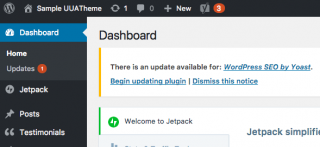
To configure your site, log in as an administrator (at http://<your-domain-name>/wp-admin). You see the Dashboard down the left side of the page and an admin menu across the top, both with black backgrounds. The Dashboard is where you’ll find the configuration commands you’ll need. The admin menu has a small subset of the commands you’ll use once the site is configured.
Configuration Settings
Here’s a list of site-wide configuration settings and how to set them.
- Congregation information, logo, and colors
- Date and time settings
- Configuring the map
- Configuration your menus, including the header and footer content
- The main menu (primary navigation menu) and the lefthand menu
- Configuring the UUA’s inSpirit Book & Gift Shop widget
Further Customization
- Customizing the Theme
- Adding Google Analytics Tracking
First, read about website accessibility for all congregational websites. The UUA Theme for Congregations includes a page about your site’s accessibility. Our instructions explain how to run tests on your site and communicate the results of your testing.
In This Section
-
Configuring Your Congregation’s Information, Logo, and ColorsFrom Unbranded
To enter your congregations’s name, address, logo, color scheme, and background, choose Appearance > Customize from the Dashboard. (Or, choose Customize from the admin menu at the top.) You see the customization menu down the left side of the page. As you make changes to these options, you can…
-
Configuring Date and Time Formats for Your WordPress WebsiteFrom Unbranded
Events listings on your website will display the times of events. You may need to customize the way the date and time appear, depending on whether you want your website to use American or Canadian/European formats. To change this in the Events plugin: Choose Events > Settings from the Dashboard….
-
Configuring the Map Using the UUA WordPress ThemeFrom Unbranded
The “Directions” link at the top of every page on your site displays a map centered on your congregation’s address. Here’s how to configure that map.
-
Configuring the Menus with the UUA WordPress ThemeFrom Unbranded
Your menus are one of the first things you need to set up on your site. General instructions for how to display the Menus page, where you can edit menus, are below, along with a list of the four menus that appear in the UUA Theme….
-
Configuring the UUA’s inSpirit Book & Gift Shop WordPress WidgetFrom Unbranded
The UUA Bookstore Widget will display a little advertisement for one book (or other product) on a general, family, or social justice topic on every page on your site, except the home page.
-
Setting Up the Main Menu in the UUA WordPress ThemeFrom Unbranded
The menu menu, also known as the primary navigation menu, appears across the top of every page, below the congregation name, logo, and tagline. It’s the primary way people find their way around your site (aside from searching). Almost every page on your site should be on the main menu. See…
-
Setting Up the Header Content in the UUA WordPress ThemeFrom Unbranded
The header, which appears on every page (see demo) features: the logo, name, and tagline of your congregation a directions link, which generates a Google Map and a link to Google Maps directions a search link, which generates a search box for your site, powered by Google Search a link to your…
-
Setting Up the Footer Content in the UUA WordPress ThemeFrom Unbranded
The footer, which appears at the bottom of every page, contains four areas, three of which are customizable (see demo). From left to right: The first (leftmost) area has the congregation’s address and contact information, with a link to directions. In the demo site, the second area has a picture…
-
Setting Up the Sidebar Content in the UUA WordPress ThemeFrom Unbranded
The UUA WordPress Theme is a three-column theme, with the main content in the center, related content in the right-hand column (right sidebar), and a menu in the left-hand column (left sidebar). All the pages in your website follow this format except for the homepage, which has its own, unique…
- UP: Configuring Your Congregational Website Using the UUA WordPress Theme
- NEXT: Configuring Your Congregation’s Information, Logo, and Colors
Get a print-friendly version of Documentation, including all sub-pages.